How to Set Up a VPN on iPhone: Complete Guide
Learn how to install a VPN on iPhone, connect with OpsVPN, and fix common issues. Includes steps to change your App Store country when a client is unavailable.
To set up a VPN on your iPhone, install an app, add your connection details, and approve the VPN configuration. A Russian Apple Account can make the first step more complicated: the app may be missing from search or unavailable in that storefront. Reuters reported VPN app removals in July 2024, and RBC documented apps disappearing from Russia's App Store.
This guide covers app installation, OpsVPN setup, manual configuration, and changing your App Store country when a client is unavailable. If your app downloads normally, you can leave your account region as it is.
What you need before installing a VPN
You'll need an internet connection and an Apple Account to download apps. Check the client's App Store listing for its minimum iOS version.
Next, identify which type of setup you're using:
A VPN provider's own app. You typically sign in to the provider's account and select a server.
A client that imports configurations. Happ and INCY need a connection key or subscription link. Your VPN provider supplies server access.
The built-in iOS VPN settings. These work when your provider or IT administrator gives you settings for a supported connection, such as IKEv2.
An empty server list in a newly installed client is normal. You still need to import a configuration. With OpsVPN, you get it from your account dashboard.
How to install a VPN app on iPhone
1. Follow the official App Store link
Start on the VPN provider's or app developer's website and follow its download link. Check the developer's name as well as the app title. A familiar icon alone doesn't identify the correct app.
Tap the download button and approve the installation. If the store says the app isn't available in your country, use the region instructions below. Keep any working VPN client installed until you've confirmed that you can download it again.
2. Sign in or import your connection details
For a provider's own VPN app, sign in to your service account. For Happ, INCY, or a similar client, import the key or subscription link your provider supplied. Installing the client doesn't create server access.
3. Allow the VPN configuration
On your first connection, iOS will ask whether the app can add a VPN configuration. Approve the request from the app you installed and enter your iPhone passcode if prompted.
This lets the app create a VPN connection. It is different from enrolling your phone in device management. A normal Happ or INCY setup doesn't require sharing your Apple Account password with anyone.
4. Connect and test
Select a server if the app offers a choice, then tap its connect button. Wait for the active connection status and open the website or app you want to use.
If the VPN connects but the service won't load, try another server or network. A connected status confirms that a tunnel is active; it doesn't guarantee that every website will be reachable.
How to set up OpsVPN on iPhone
The OpsVPN iPhone setup instructions list Happ and INCY as supported clients. OpsVPN provides your personal configuration, which the client uses to connect.
1. Sign in to your OpsVPN account and open the VPN section.
2. Select iPhone and install the recommended client using the dashboard link. For Happ, you can also check the current download link on the developer's official website. Regional app names can change.
3. Copy your entire connection key using the copy button.
4. Open the client and look for the option to add a configuration from your clipboard. If the dashboard offers a button that opens the configuration directly in the client, you can use that instead.
5. Select the imported profile or server, connect, and approve the iOS VPN request.
6. Test the service you need on both Wi-Fi and cellular data.
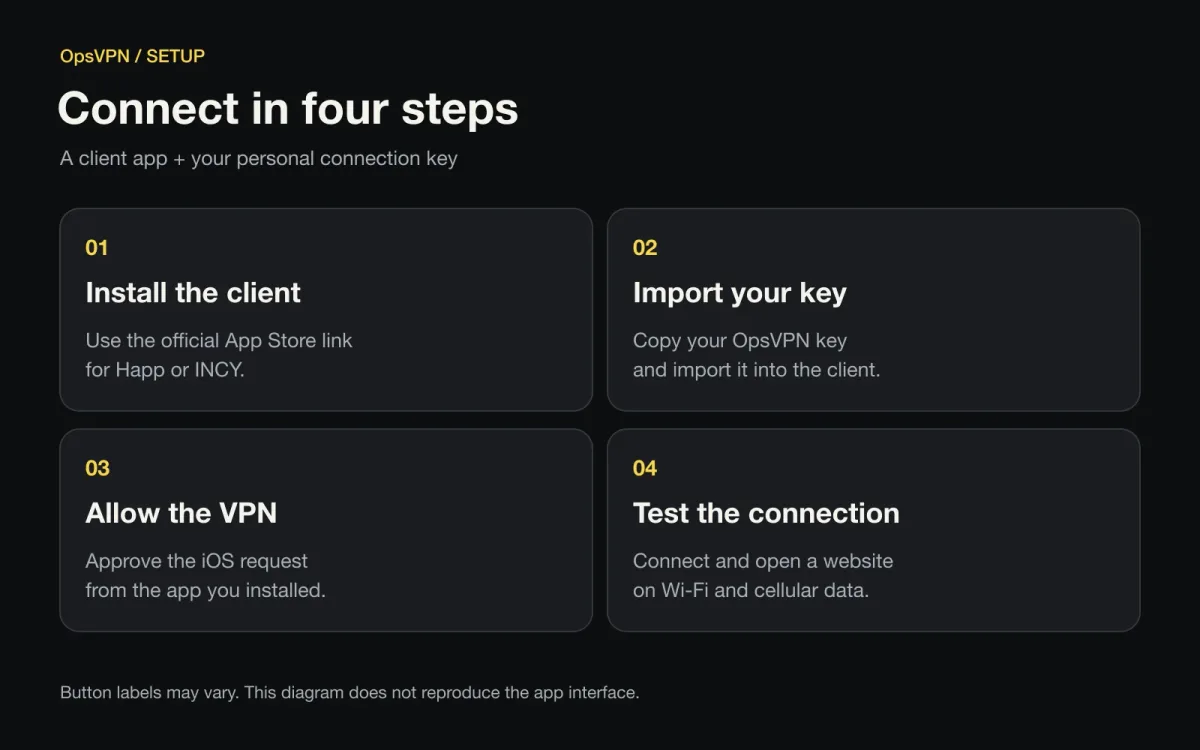
The connection sequence. Button labels vary by client and version.
A standard VLESS connection key begins with vless://. Copy the entire string, including everything after the question mark. Links designed for one particular client should be opened in that client. The INCY and Happ comparison explains the different formats.
Treat your connection key as an access credential. Keep it out of public comments and screenshots. When asking support for help, start with the error message, your iOS version, and the client you're using.
Why a VPN app may be missing from Russia's App Store
A VPN app can remain available in some storefronts while being unavailable to Apple Accounts set to Russia. The reporting linked in the introduction documents this happening. It doesn't mean every VPN has been removed or that every missing search result indicates a restriction.
First, try the developer's direct link. The app may have a new name or a separate regional version. Then read the exact App Store message. An unsupported iOS version, a billing issue, and a country restriction call for different fixes.
Three settings are easy to confuse:
Your Apple Account country determines the regional App Store associated with the account.
Your iPhone language and region control interface language and formats such as dates and numbers.
Your VPN server location changes the route and public IP address for traffic sent through that VPN.
Connecting to a US VPN server doesn't automatically turn a Russian App Store account into a US account. If your client is only available in another storefront, changing your Apple Account country is one possible route, provided you meet Apple's requirements.
How to change your App Store country on iPhone
Review your account before switching
Check these items first:
Store credit. Open your profile in the App Store to check the balance. Spend any remaining credit; contact support if the amount is too small to use. See Apple's balance instructions.
Subscriptions. Review Subscriptions in your account settings. Cancel any that prevent a country change and wait for them to expire. Apple explains how to cancel a subscription.
Pending transactions. Let refunds, preorders, and rentals finish processing.
Family Sharing. Membership in a family group can prevent a country change. Leaving the group can affect access to shared purchases and subscriptions.
Billing information. Have accurate details for the new country and an accepted payment method if Apple requires one. Check Apple's supported payment methods.
If switching requires canceling iCloud+ or Apple One, check your stored data and what happens when you downgrade iCloud storage first. Syncing and backups can be affected.
Change the country in your account settings
2. Open Settings and select your account at the top.
3. Go to Media & Purchases, then Country/Region. Some iOS versions first show View Account.
4. Select the destination country, continue, and accept the terms.
5. Complete the requested billing details and save.
6. Reopen the App Store and your client's download link.
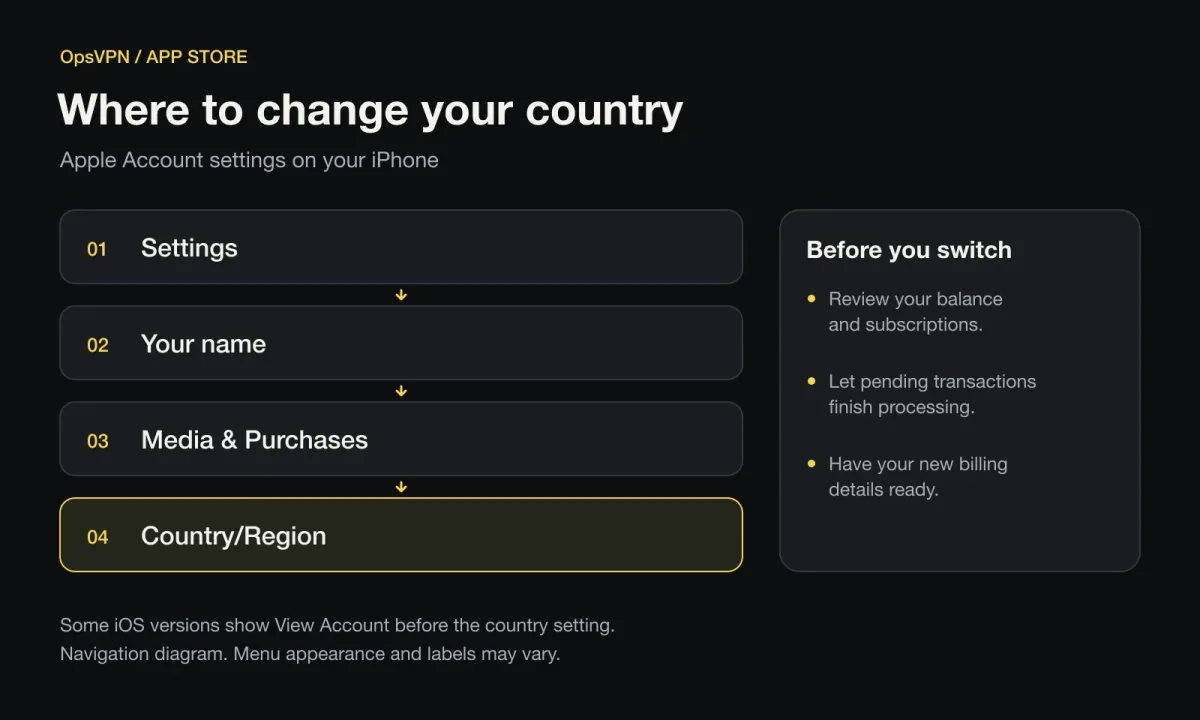
A navigation diagram, not an iOS screenshot. Some versions include an extra View Account step.
Choose a country where the app is available and you can meet the account and billing requirements. There isn't one universally best App Store region for VPNs. Don't assume you'll always be able to continue without a payment method.
If Apple won't let you change countries
Use the error message to narrow down the cause. Turning off subscription renewal doesn't end the current paid period. A zero balance doesn't resolve a Family Sharing restriction or a pending transaction.
If Apple reports a billing problem with a previous purchase, check for an unpaid order. An unpaid balance can block free app downloads too, according to Apple's billing guidance.
If you need your current subscriptions, first check whether another compatible client is available in your existing store. Changing your account country for one download may complicate the services you use every day.
Can you configure an iPhone VPN without an app?
Yes, if you have access to a server that supports a protocol built into iOS. For example, iOS supports manual IKEv2 setup, as described in the strongSwan documentation.
Open Settings → General → VPN & Device Management → VPN.
Choose the option to add a VPN configuration and select the required type, such as IKEv2.
Enter the server address, Remote ID, and authentication details supplied by your provider. Use a Local ID or certificates if your setup requires them.
Save the configuration and turn on the connection.
The VPN settings screen doesn't include a free server. You also can't paste an OpsVPN VLESS key into the server field of an IKEv2 configuration. They're different protocols. Use a compatible client for your OpsVPN configuration.
How to check whether your iPhone VPN is working
Check the connection status in the client or search for VPN in Settings. Open the service you need and test it on Wi-Fi and cellular data.
You can also compare your public IP address before and after connecting, using the same IP-checking service both times. If that request goes through the VPN, it will generally show the server's exit address. Client routing rules and iCloud Private Relay can affect what you see. A changed browser IP alone doesn't prove that every connection from your phone is protected.
What to do if your iPhone VPN won't connect
Work through these checks in order:
Test the internet without the VPN. Disconnect and open a regular website. Public Wi-Fi may require you to complete a sign-in page first.
Check your imported configuration. Copy the full key again if the profile is empty or the import failed. If you use a subscription link, try refreshing it in the client.
Check your server access. Confirm that your access is still active in your provider's dashboard.
Try another server and network. If the same setup works on Wi-Fi but fails on cellular data, tell support which network is affected.
Check other VPN clients. Turn off other active VPN connections and review their automatic connection settings.
Review routing and DNS. Follow the provider's instructions if the tunnel connects but nothing loads. Change one setting at a time so you can identify what helped.
Save reinstallation for later. Before removing the client, keep a copy of your key and verify that you can download the app again. If the issue continues, contact OpsVPN support with the network type, client, iOS version, and exact error message.
FAQ
Does iPhone have a free built-in VPN?
iOS includes VPN configuration settings, but they don't provide a public VPN server. You need server access from a provider, your employer, or a server you manage yourself.
Do I have to change a Russian App Store account's country?
No. If a suitable client is available to your account, install it normally. Consider a country change when the app you need isn't available in your current storefront and you can meet Apple's requirements.
Will my VPN app disappear if Apple removes it from the store?
A regional delisting generally doesn't remove an app that's already installed. However, redownloading it and getting updates can become difficult. The connection itself also depends on the client, server, and network.
Can I switch back to the Russian App Store afterward?
Yes, if you meet Apple's requirements for another country change. Switching back doesn't guarantee that the client will be available for redownload or updates in the Russian store.
Can I install an iPhone VPN for free?
Yes, if the app is free to download. A free client download doesn't necessarily include free server access. Check your VPN provider's current terms separately.
Is iCloud Private Relay the same as a VPN?
No. Private Relay helps protect browsing in Safari, but it doesn't offer the same server selection or app connection rules as a VPN client. The two features serve different purposes.
Why is my VPN connected but a website still won't load?
Possible causes include routing rules, DNS, a server problem, or restrictions imposed by the website. Try another server and network. If only one service fails, give support its address.
How do I turn off a VPN on iPhone?
Open your VPN client and disconnect. If it reconnects, check automatic connection or Connect On Demand settings in the app and iOS VPN settings.
Does a VPN make everything I do anonymous?
No. A VPN changes the route and protects traffic within the limits of its configuration. It doesn't erase account logins, cookies, location permissions, or other ways services recognize you.
Connect your iPhone to OpsVPN
Open your OpsVPN account, select iPhone, and get your connection settings. If your client is already installed, import the key. If the App Store blocks the download, check the official link and your account country using the steps above.