Mobile Data Not Working Today? Russia’s Allowlists and TSPU
Seeing LTE but no internet in Russia? Learn how mobile outages, internet allowlists, and TSPU filtering differ—and what to check on your phone.

Your phone shows LTE or 4G, but websites won’t load, messages won’t send, and apps keep spinning. The cause could be your phone settings, your wireless plan, a carrier outage, or a network restriction.
In Russia, another possibility is an internet allowlist: access remains available to selected services while other destinations are unreachable. Russia also uses network filtering infrastructure known as TSPU.
This guide explains those Russia-specific mechanisms for U.S. readers and travelers. They should not be assumed to explain an ordinary mobile data outage in the United States.
Why Is Mobile Data Not Working Today?
There is no single explanation that applies to every location and carrier. Even within one city, availability can differ from one neighborhood to another.
Possible causes include:
an exhausted data allowance or an account restriction;
mobile data being turned off;
the wrong SIM being selected for data;
weak coverage or network congestion;
a carrier equipment failure;
an outage affecting a particular website or app;
restrictions on mobile internet access.
Start by checking your account, phone settings, and several unrelated websites. Russian carrier MTS recommends checking the connection and distinguishing a single-service problem from a broader loss of internet access.
Why Does My Phone Show LTE With No Internet?
The LTE or 4G indicator identifies the type of cellular connection. It does not guarantee that your phone can reach every server on the internet.
Strong signal bars can coexist with a carrier outage, congestion, an account issue, or traffic filtering. Signal strength is only one part of the connection.
What Is an Internet Allowlist in Russia?
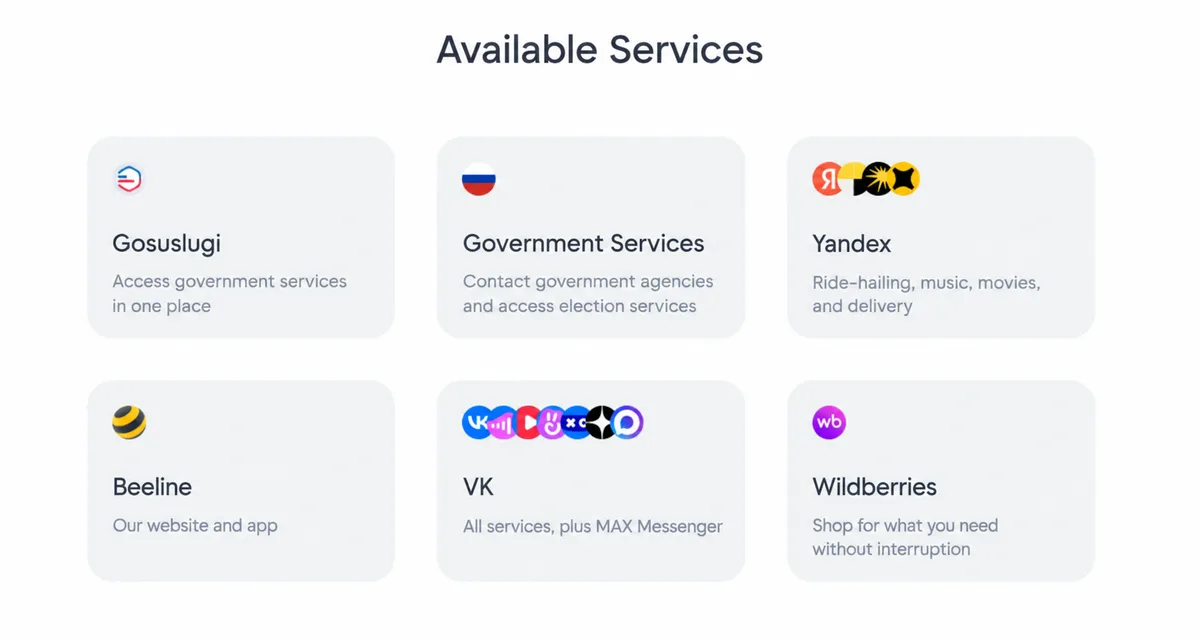
An allowlist—also called a “whitelist”—identifies online services that remain accessible during certain mobile internet restrictions.
Russia’s Ministry of Digital Development describes this arrangement as a way to preserve access to widely used and socially important services during restrictions imposed for security reasons.
Under an allowlist model, selected destinations remain reachable while broader access may be unavailable. The accessible services are not operating “without internet.” They still require a working data connection.
Which Services May Remain Available?
Published announcements have included government resources, social platforms, shopping services, and financial and transportation services.
For example, a February 4, 2026 expansion named VTB, PSB, CDEK, Samokat, and the GIS Housing and Utilities platform. These are examples from an announcement, not a complete current list.
Check your carrier’s information for specific services. MegaFon, for example, publishes a page covering services available during restrictions.
Does Being on the List Guarantee Access?
No. An allowlist does not eliminate weak coverage, equipment failures, or outages affecting the service itself.
Likewise, a single working website does not prove that an allowlist is active. You need more information about the connection and any announced restrictions.
What Is TSPU?
TSPU is a Russian acronym commonly translated as “technical means for countering threats.” It refers to hardware and software within telecommunications networks.
It is not an app or a setting on your phone. Technical requirements describe connecting this equipment to carrier infrastructure and providing remote management access to Russia’s public communications network monitoring and management center.
How Can TSPU Affect Internet Connections?
Published technical documentation describes traffic analysis and filtering, protocol identification through deep packet inspection, and functions for blocking or degrading particular types of connections.
Deep packet inspection, or DPI, helps classify traffic using observable network characteristics.
Is TSPU the Same Thing as an Allowlist?
No. An allowlist specifies which destinations should remain accessible. TSPU refers to technical infrastructure used to process and filter traffic.
Identifying the mechanism behind a particular outage requires evidence. A failed page load alone cannot establish that TSPU caused the problem.
How to Narrow Down the Problem
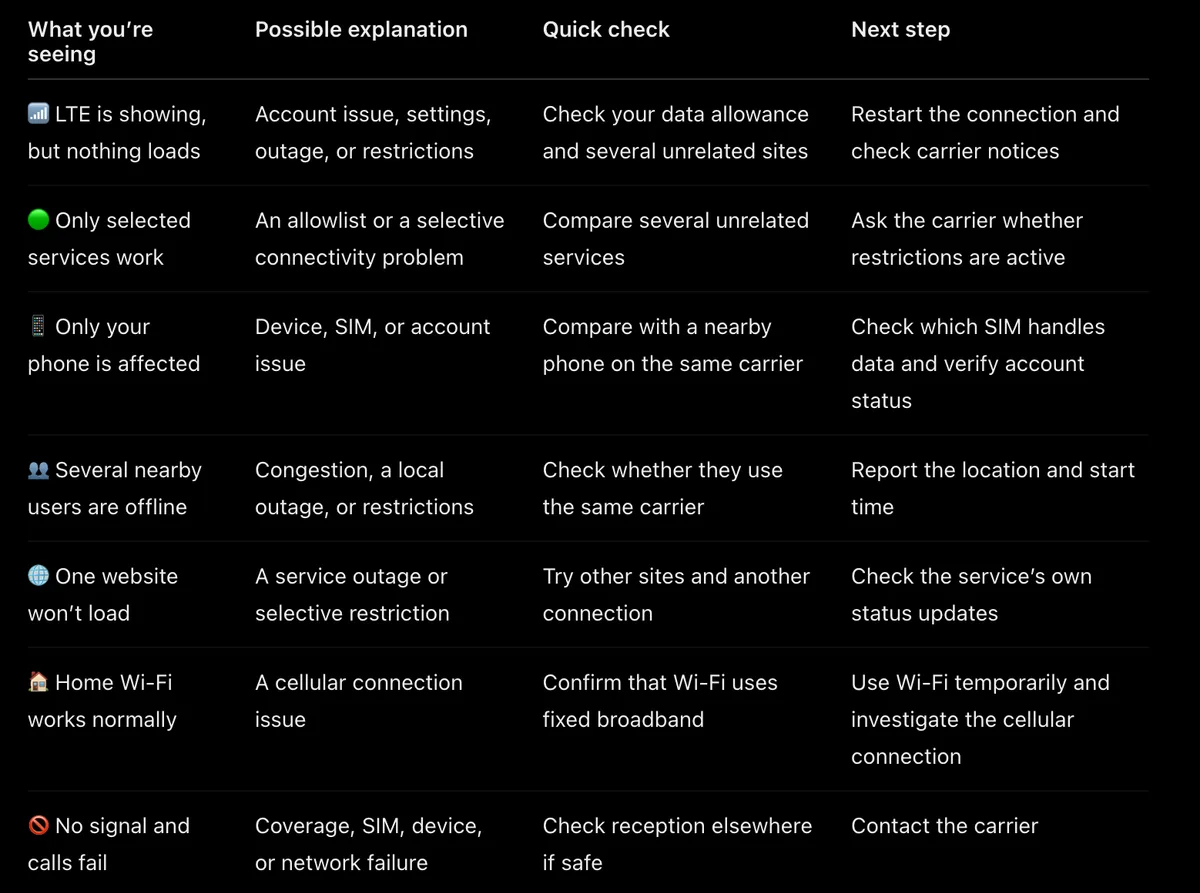
Use these symptoms to choose your next check. The possible causes are starting points, not confirmed diagnoses.
What to Do When Mobile Data Stops Working
Step 1: Check Your Phone and Wireless Account
Make sure cellular data is enabled. On a dual-SIM phone, confirm that the intended line is selected for data. Check your balance and remaining allowance.
Toggle Airplane Mode off and on, or restart the phone. MTS includes restarting the connection among its troubleshooting recommendations.
When to Check Your APN Settings
If data stopped working after installing or replacing a SIM, compare the access point name, or APN, with your carrier’s official instructions. Settings are carrier-specific, so avoid copying an unrelated configuration.
Step 2: Compare Connections
Try several websites, ask nearby users whether they have service, and test a known Wi-Fi connection.
Remember that a Wi-Fi router or hotspot may itself use cellular data. If so, it can be affected by the same mobile network problem.
Step 3: Check Notices and Contact Support
Look for current announcements from the carrier and, in Russia, the relevant regional authorities. Check the date and affected area carefully.
When contacting support, provide your location, the time the issue began, your phone model, and examples of services that fail. Mention whether calls and texts still work.
Why a Factory Reset Shouldn’t Be Your First Move
A factory reset cannot repair a carrier outage or remove a network-level restriction. Start with basic checks before taking a step that requires restoring your apps and data.
Will a VPN, Different DNS, or Another SIM Help?
A VPN needs a reachable server and a functioning data connection. Turning it on does not automatically restore access when that underlying connection is unavailable.
Changing DNS may help with a domain-name resolution problem. It is not a general fix for network failures or traffic filtering.
Another SIM may help when the problem is specific to one carrier or its coverage. It cannot guarantee access during restrictions affecting multiple networks.
A functional VPN that bypasses whitelists across all mobile carriers
When Will Mobile Internet Be Restored?
The timeline depends on the cause. Account and settings issues may be resolved quickly. A carrier may provide an estimate for an equipment outage. For restrictions, restoration timing should come from official notices rather than speculation.
While access is unreliable, download maps and save tickets, addresses, and other essential information for offline use. If voice and text services remain available, try a regular call or SMS for urgent communication.